The <delayed-turn> element
Parent element: <ornaments>
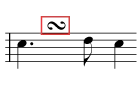
The <delayed-turn> element indicates a normal turn that is delayed until the end of the current note.
Content
Always empty.
Attributes
| Name | Type | Required?(Default) | Description |
|---|---|---|---|
| accelerate | yes-no | No | If yes, the trill accelerates during playback. It is no if not specified. |
| If yes, the trill accelerates during playback. It is no if not specified. | |||
| beats | trill-beats | No | The number of distinct notes during playback, counting the starting note but not the two-note turn. It is 4 if not specified. |
| The number of distinct notes during playback, counting the starting note but not the two-note turn. It is 4 if not specified. | |||
| color | color | No | Indicates the color of an element. |
| Indicates the color of an element. | |||
| default-x | tenths | No | Changes the computation of the default horizontal position. The origin is changed relative to the left-hand side of the note or the musical position within the bar. Positive x is right and negative x is left.
This attribute provides higher-resolution positioning data than the |
| Changes the computation of the default horizontal position. The origin is changed relative to the left-hand side of the note or the musical position within the bar. Positive x is right and negative x is left.
This attribute provides higher-resolution positioning data than the | |||
| default-y | tenths | No | Changes the computation of the default vertical position. The origin is changed relative to the top line of the staff. Positive y is up and negative y is down.
This attribute provides higher-resolution positioning data than the placement attribute. Applications reading a MusicXML file that can understand both attributes should generally rely on this attribute for its greater accuracy. |
| Changes the computation of the default vertical position. The origin is changed relative to the top line of the staff. Positive y is up and negative y is down.
This attribute provides higher-resolution positioning data than the placement attribute. Applications reading a MusicXML file that can understand both attributes should generally rely on this attribute for its greater accuracy. | |||
| font-family | font-family | No | A comma-separated list of font names. |
| A comma-separated list of font names. | |||
| font-size | font-size | No | One of the CSS sizes or a numeric point size. |
| One of the CSS sizes or a numeric point size. | |||
| font-style | font-style | No | Normal or italic style. |
| Normal or italic style. | |||
| font-weight | font-weight | No | Normal or bold weight. |
| Normal or bold weight. | |||
| last-beat | percent | No | The percentage of the way through the duration for landing on the last beat. It is 75 if not specified. |
| The percentage of the way through the duration for landing on the last beat. It is 75 if not specified. | |||
| placement | above-below | No | Indicates whether something is above or below another element, such as a note or a notation. |
| Indicates whether something is above or below another element, such as a note or a notation. | |||
| relative-x | tenths | No | Changes the horizontal position relative to the default position, either as computed by the individual program, or as overridden by the default-x attribute. Positive x is right and negative x is left. It should be interpreted in the context of the <offset> element or directive attribute if those are present. |
Changes the horizontal position relative to the default position, either as computed by the individual program, or as overridden by the default-x attribute. Positive x is right and negative x is left. It should be interpreted in the context of the <offset> element or directive attribute if those are present. | |||
| relative-y | tenths | No | Changes the vertical position relative to the default position, either as computed by the individual program, or as overridden by the default-y attribute. Positive y is up and negative y is down. It should be interpreted in the context of the placement attribute if that is present. |
| Changes the vertical position relative to the default position, either as computed by the individual program, or as overridden by the default-y attribute. Positive y is up and negative y is down. It should be interpreted in the context of the placement attribute if that is present. | |||
| second-beat | percent | No | The percentage of the way through the duration for landing on the second beat. It is 25 if not specified. |
| The percentage of the way through the duration for landing on the second beat. It is 25 if not specified. | |||
| slash | yes-no | No | The slash group combines elements used for more complete specification of the slash and beat-repeat measure-style elements. They have the same values as the type and dot elements, and define what the beat is for the display of repetition marks. If not present, the beat is based on the current time signature. |
| The slash group combines elements used for more complete specification of the slash and beat-repeat measure-style elements. They have the same values as the type and dot elements, and define what the beat is for the display of repetition marks. If not present, the beat is based on the current time signature. | |||
| start-note | start-note | No | The starting note for playback, relative to the current note. It is upper if not specified. |
| The starting note for playback, relative to the current note. It is upper if not specified. | |||
| trill-step | trill-step | No | The alternating note for playback, relative to the current note. It is whole if not specified. |
| The alternating note for playback, relative to the current note. It is whole if not specified. | |||
| two-note-turn | two-note-turn | No | Specifies the two-note turn included at the end of the trill, if any. It is none if not specified. |
| Specifies the two-note turn included at the end of the trill, if any. It is none if not specified. | |||
Examples
This element is used in the following example: